


STEP 4: Chart Integration or Website Builder
Last Updated: Dec 9, 2025
This guide walks you through every aspect of chart integration at Bodygraph.com. You will learn about available chart types, how to embed them into external websites, how to connect designs and languages, how to use the built-in website builder, and which common mistakes to avoid. The goal is to help you set up a smooth and reliable chart experience for your clients, regardless of which platform you use.
Overview of Available Chart Types
Bodygraph.com supports several chart formats that can be integrated as standalone or multi-chart calculators. You can choose a single chart type or allow users to switch between several options within the same embed.
Supported chart types include:
Traditional Human Design chart
Individual chart
Astrology chart
Composite charts
Relationship charts
Transits
Cycles
Success Codex embedded charts
When creating an embed code, you can choose:
Standalone chart integration
Example: Human Design only or Astrology only.Multi-chart integration
Example: Human Design and Astrology together.
This allows users to select which chart to run at your integration.
Keep in mind that multi-chart embeds have some limitations related to downloads and button layouts. Those limitations are explained at the video tutorial added to this article.
New users start with one default embed code, set to Human Design only. You can edit this embed at any time by:
Clicking the three dots next to the embed
Adjusting the chart type
Enabling additional chart types if needed
You may also create unlimited new embed codes. Many users build separate landing pages for Human Design, Astrology, or composite charts, each using its own embed.
Connecting Your Designs and Languages
Before embedding the chart in any external website or inside the Bodygraph website builder, you need to connect:
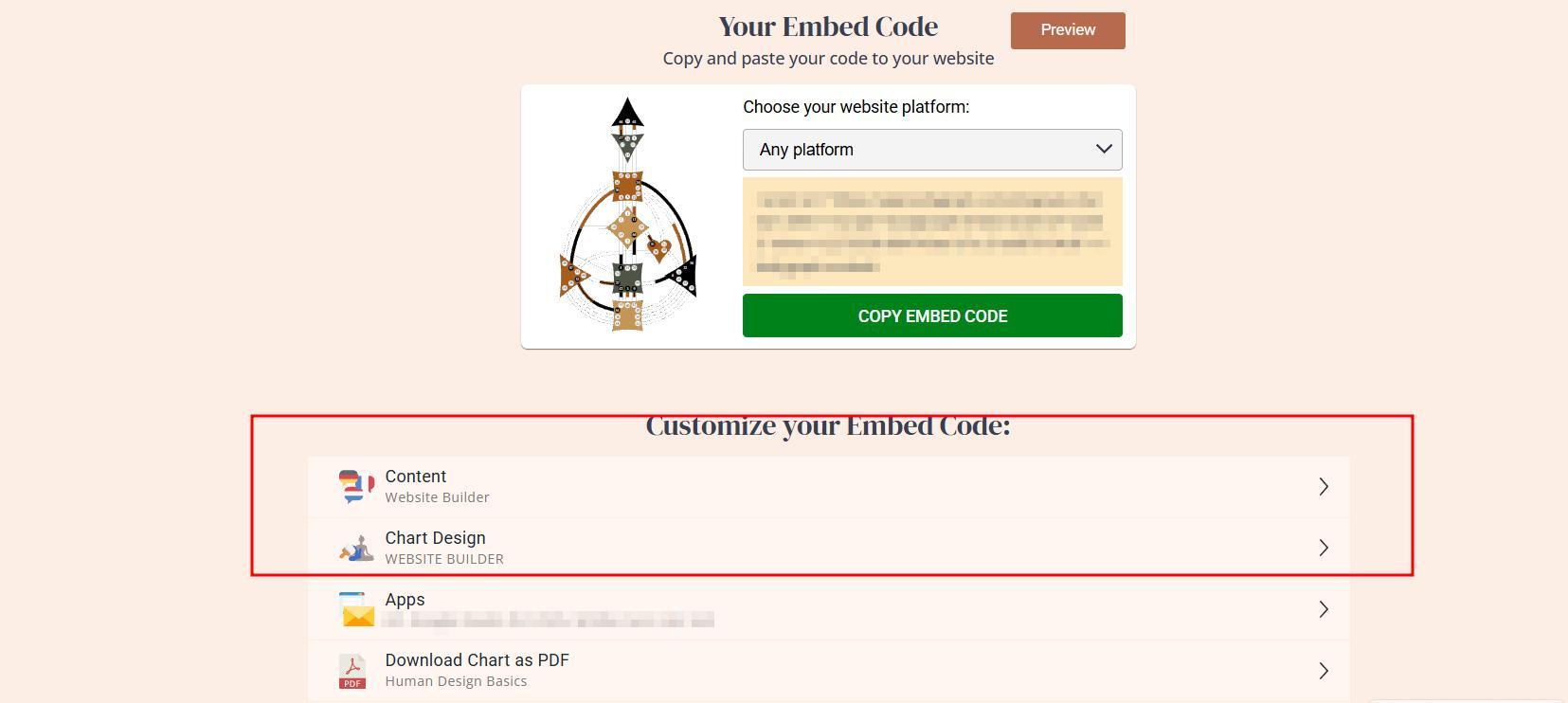
This is done directly inside the embed code settings.
Once connected, the embed is ready for publishing. Any future updates to design or language go live instantly without re-embedding the code.
Embedding Into External Websites
Embedding is straightforward. The main requirement is that your website builder supports custom code or HTML blocks.
How to know if your website supports embedding
Check Bodygraph Help Center → Integrations category.
You will find guides for builders such as:
Squarespace
Wix
GoDaddy
WordPress
Shopify
Showit
Webflow
- and more.
Even if your builder is not listed, most platforms that provide:
HTML blocks
Code blocks
Custom elements
will support Bodygraph embeds.
Important:
Free or basic plans on some website builders do not allow custom embedding. You might see the chart inside the editor, but it will not appear on the live site. Always confirm with your website provider that your subscription tier supports embedded code.
Updates After Embedding
Once the embed is placed on your site:
You do not need to re-embed it after changing settings: designs, languages, app integrations etc.
All updates to designs, languages, styles and app integrations go live instantly
Only deletion of the embed code requires re-embedding
Using the Bodygraph Website Builder
If you do not have a website, Bodygraph includes a simple built-in website builder at no extra cost.
Key features
Free subdomain with customizable prefix
Example: yourbrand.bodygraph.ccAbility to connect a professional custom domain purchased elsewhere
Stack-based building method for non-technical users
It does not offer advanced features like:
Pop-ups
Funnels
Complex animations
Full layout control
However, it is more than enough for your first landing page or a simple full website.
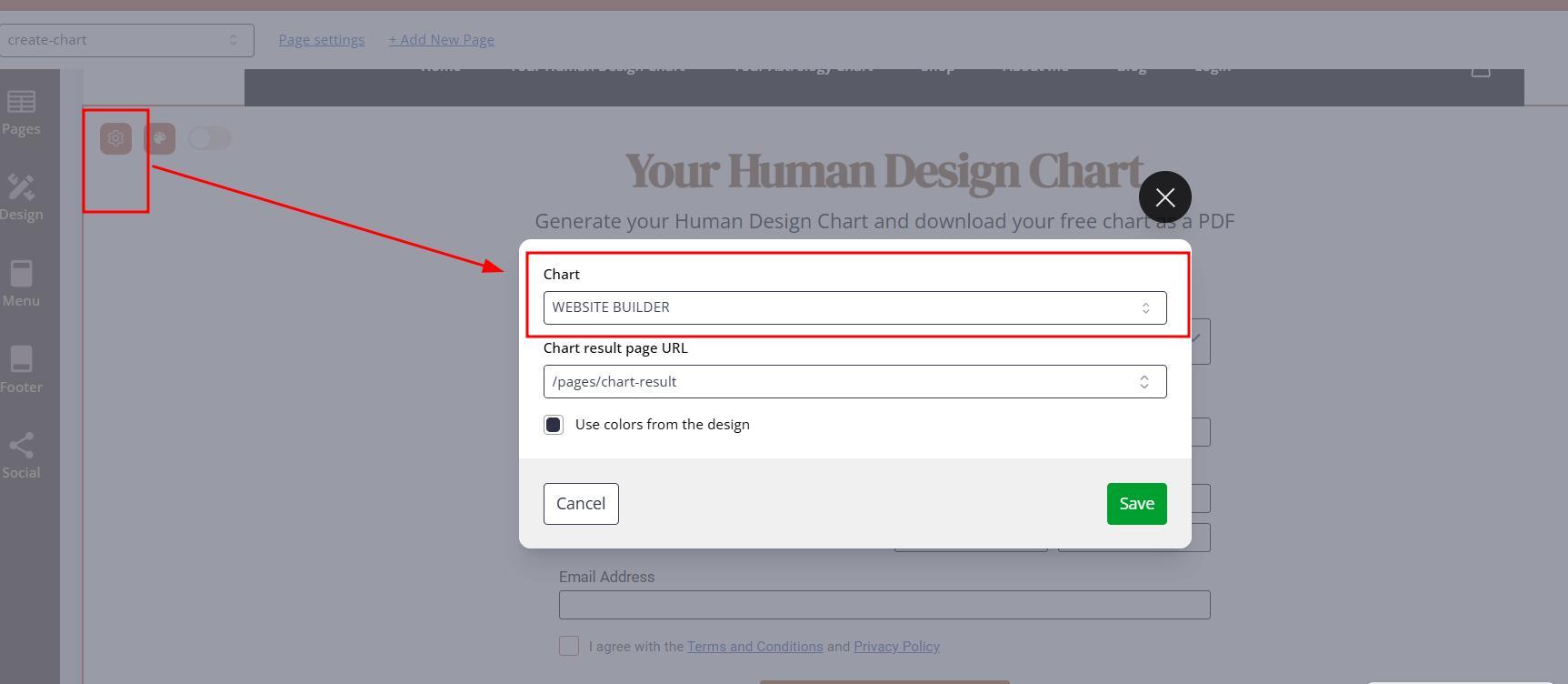
Linking a chart inside the Bodygraph builder
Embedding works differently here, because the builder has a dedicated chart element. Therefor linking embed to the chart element only requires to select embed at chart section settings:
Shop Experience vs Standard Integration
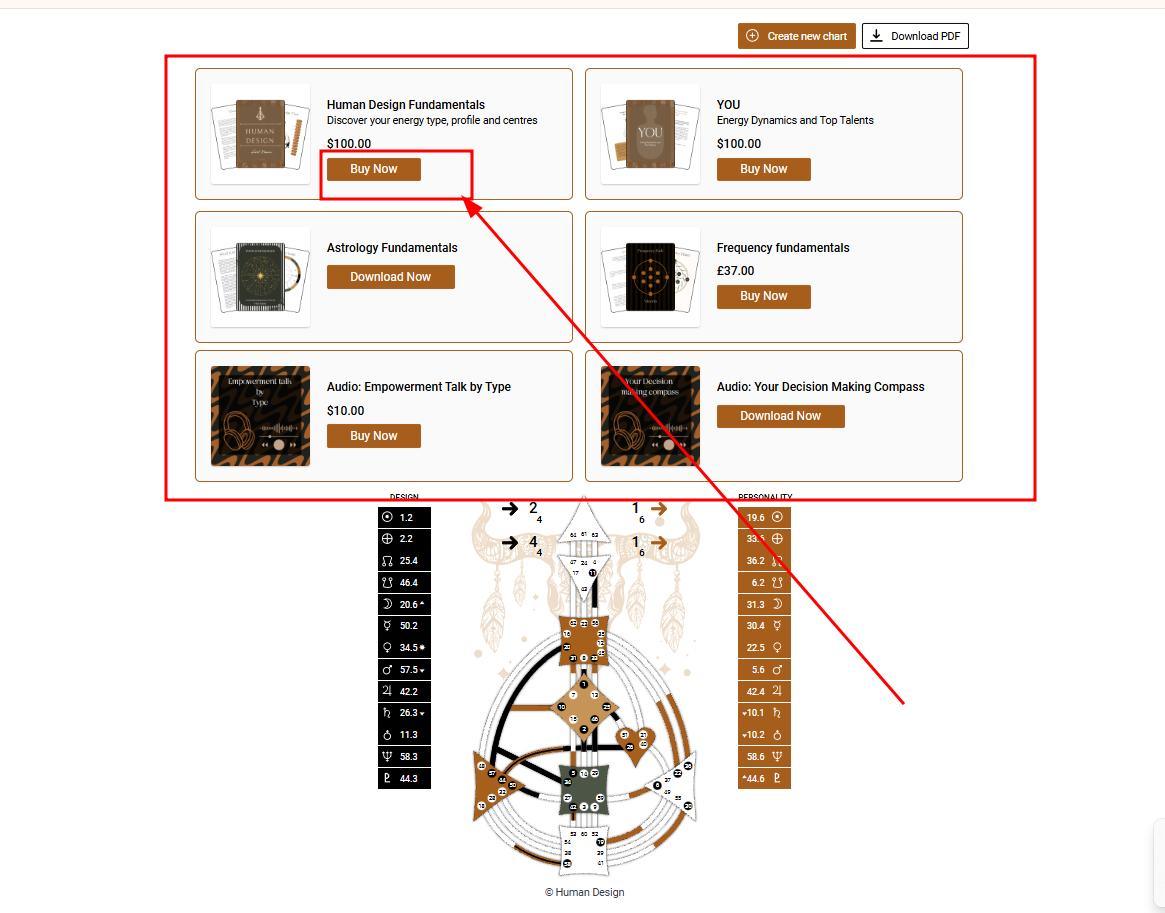
External websites use the standard integration:
Client submits the form
Chart appears
Report widgets show above or below the chart
Client buys reports individually through separate checkouts
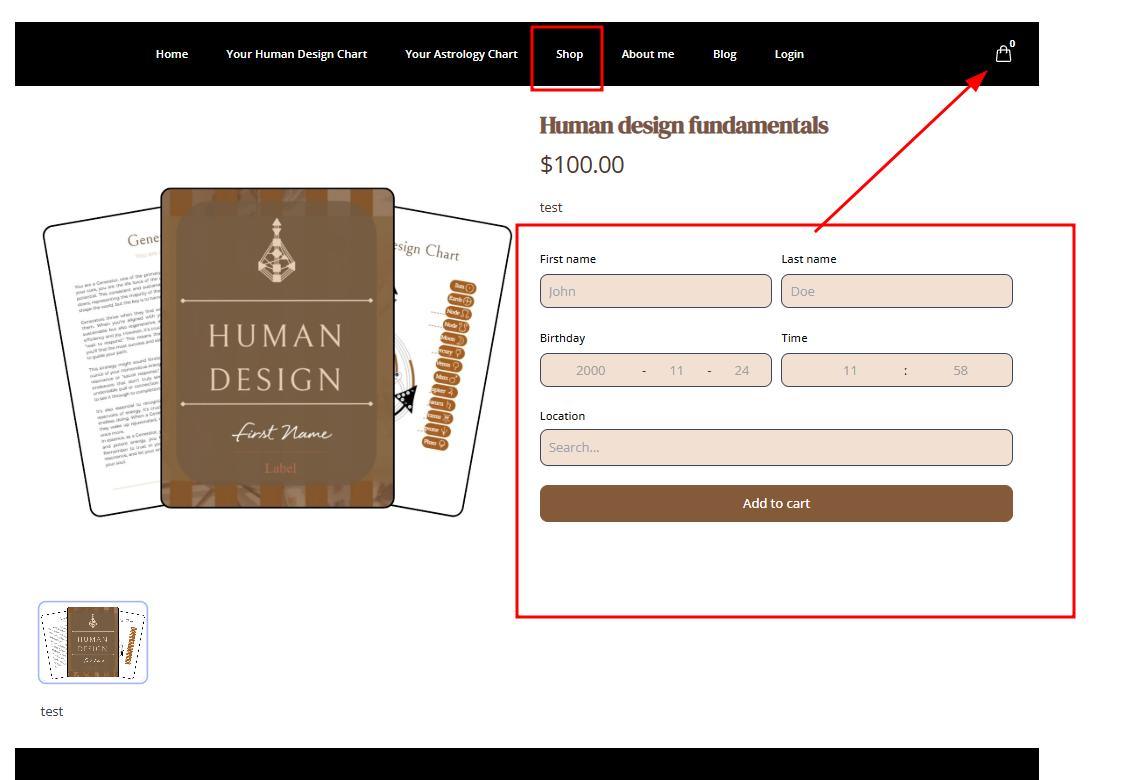
The Bodygraph website builder offers an alternative:
Clients can add multiple reports to a cart
They can check out all reports at once
Provides a more traditional shop experience
If you already own an external site, you can link a subdomain to the Bodygraph builder and use it exclusively as your shop.
Common pattern:
External website hosts your main website
Subdomain hosts your Bodygraph shop
Users navigate between them using menu redirects.
This approach commonly used by subscribers who do not want to build website inside Bodygraph but wants to benefit from the shop layout.
Common Mistakes To Avoid
1. Using the wrong embed code
If presets do not appear correctly, you likely embedded the wrong code.
Confirm by checking the embed ID in:
Your website editor
Bodygraph embed settings
They must match.
2. Using the right code in the wrong element
This affects Wix and Podia especially.
Always confirm which element supports custom embeds.
3. Forgotten design settings
Examples:
Email field hidden because remember visitor for 14 days is enabled
Time and date formats checked in wrong location
Labels edited in the wrong tool (labels come from Content, not Design).
4. Unfinished settings
The most common cause of broken embeds is incomplete redirection setups.
If you enable redirection:
You must provide a full URL
URL must include https://
The target page must use the same embed code
If anything is missing, the embed will throw errors.
5. Broken CSS adjustments
Advanced CSS can be used to adjust:
Button colors
Text alignment
Layout changes
Link colors
Incorrect CSS can break the entire integration. If you are not comfortable working with CSS, keep adjustments minimal or consult a certified Bodygraph VA.
Frequently Asked Questions
Can I integrate multiple chart types in one embed code?
Yes. You can choose single-chart integration or multi-chart integration. Multi-chart integration lets clients switch between chart types, though it has some limitations for downloads and buttons.
Can I embed charts into multiple websites?
One subscription serves only one domain and it’s subdomains. if you wish to embed chart for example to HD.com and to ASTRO.com that will require you to have 2 subscriptions to serve each. More information can be found here.
How many embed codes do I get with a new account?
You start with one default embed code set to Human Design only. You can edit this type or create unlimited new embed codes for different pages.
Do most website builders support Bodygraph embed codes?
Most builders that support HTML or custom embedding will work. The Help Center lists common supported builders. If yours is not listed, check your builder’s support articles or ask their team.
Do I need to re-embed the chart after making changes?
No. Changes to design, language, or embed code settings update automatically on the live site.
Does the Bodygraph website builder support advanced features like animations or pop-ups?
No. It is intentionally simplified. It is ideal for basic sites, starting pages, blogs, selling reports, and simple business layouts.
Also check video tutorial below:
Still have questions? Is above guide outdated? Please message us on Live Chat or send an email to support@bodygraph.com.

All the Tools You Need to Build, Grow, and Scale Your Human Design and Astrology Business

