
Paid reports are one of the strongest revenue streams you can add to your Bodygraph.com integration. They allow you to deliver tailored Human Design, Astrology, or Frequency insights instantly, without hands-on work for each client. This guide walks through every important step – from choosing ready-made reports, to building your own versions, to understanding visibility tags, audio tracks, settings, and common mistakes to avoid.
Understanding Report Types
Bodygraph.com supports two main categories:
PDF Reports – Often referred to as digital products, e-books or downloadable reading reports. Clients either download them instantly if free or after completing payment.
Audio Reports – A series of audio tracks combined into a single personalized experience based on the client’s chart calculations.
Both can be sold automatically through your chart integrations once they are enabled and linked to payment settings.
Using the Ready-Made Report Library
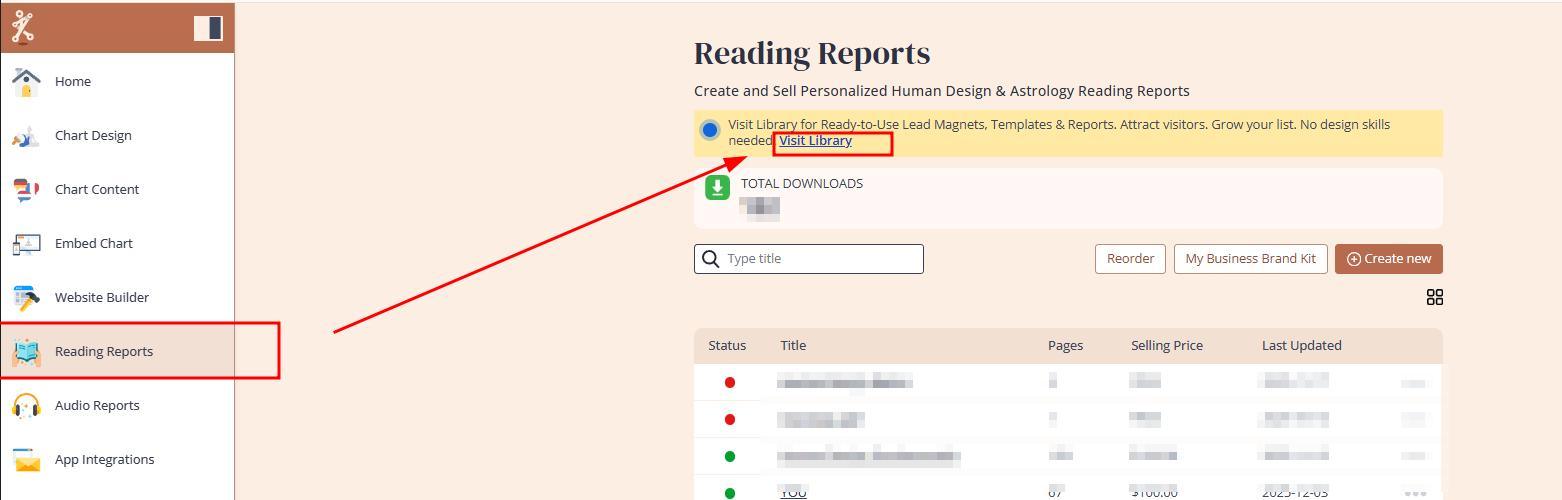
Bodygraph.com provides a library of pre-built reports. To explore it:
Sort the library by Reading Reports to see available PDFs. Please keep in mind that only Reading Reports and Lead Magnet categories hold content. Any reports listed under Template category holds only dummy (placeholder) text for you to paste your content in.
Preview each report before installation.
Choose your preferred formatting style and install it into your editor.
Key points:
All ready-made reports except Quantum Human Design are fully editable.
You can customize branding, colors, layouts, backgrounds and cover pages.
Premium reports require a one-time payment for installation.
After purchase, you can duplicate them and create unlimited variations.
Purchasing premium reports is optional. You can build your own from scratch using the reading reports tool.
A good approach is to install all reports you like, adjust the branding, and use them as your first paid products while you are developing your own signature content.
Editing a Ready-Made PDF Report
When you open an installed report – for example, Midnight Dunes Version Two – your brand kit, that you prepared at Step 1 of the onboarding, becomes available. This lets you update colors, fonts, and visual style instantly across the ready made report.
The content and page tagging are already completed for you, which means:
You only adjust the design.
You only rewrite or enrich text where needed.
Your first paid report can be ready very quickly.
The Page Visibility Feature – The Core of Report Automation
Every personalized PDF relies on a small rectangle tag (above each page) called page visibility. This is what enables Bodygraph’s automation to select correct pages for each client.
How it works:
Generic pages such as cover, About Me, or introduction are marked visible for everyone.
Property based pages (for example Type – Generator, Authority – Emotional, Sun Sign – Cancer) must be tagged accordingly.
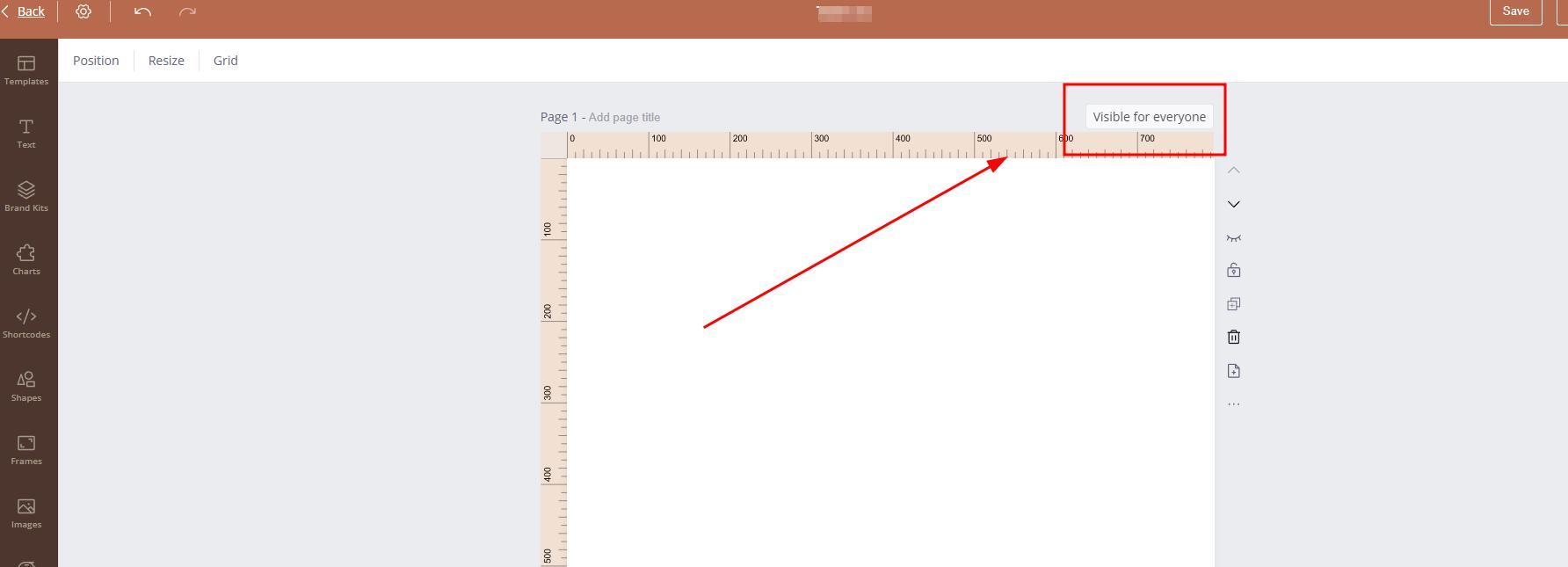
When you click the visibility rectangle:
A menu opens listing available Human Design, astrology and frequency properties.
You assign the page to the property it explains.
The system then:
Includes all generic pages.
Plus selects only the tagged pages matching the client’s birth data.
Produces a fully customized PDF for the client.
To build a full report, you create a master file containing every possible type, authority, sign, profile and other variations you want to offer, then tag each page and system will do the magic when your client will provide birth details.
Creating Audio Reports
Audio reports work almost identically, except instead of pages you build chapters filled with tracks.
Process overview:
Add as many chapters as you like.
Upload pre-recorded audio tracks.
Assign visibility rules to each track based on the relevant property (for example, authority, type, sun sign).
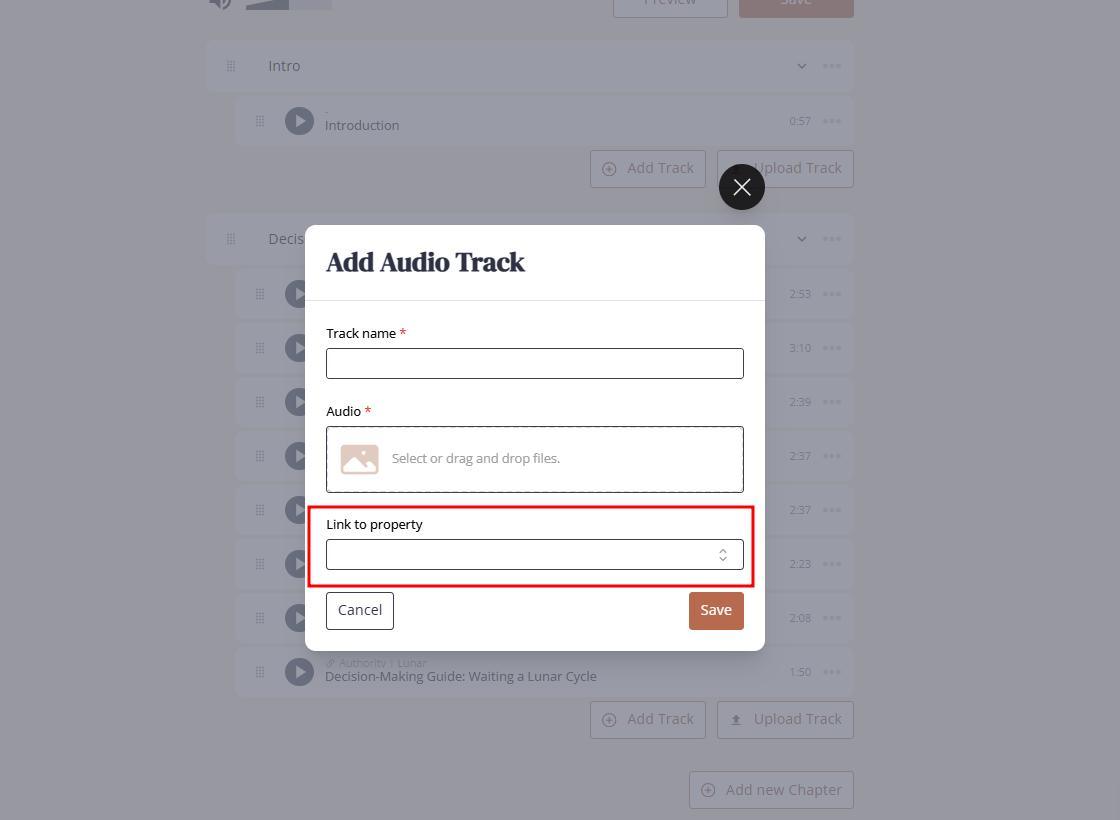
Important notes:
Bodygraph.com does not include recording or editing tools. You must prepare tracks externally.
When a client downloads the audio report, the system automatically combines only the tracks that match their chart.
You can also browse the audio report library, install ready-made audio products, test them, and offer them as free or paid downloads.
Critical Settings You Must Match Across Tools
Astrology Systems
For astrology-based reports, the house system must match in both places:
Your design tool settings.
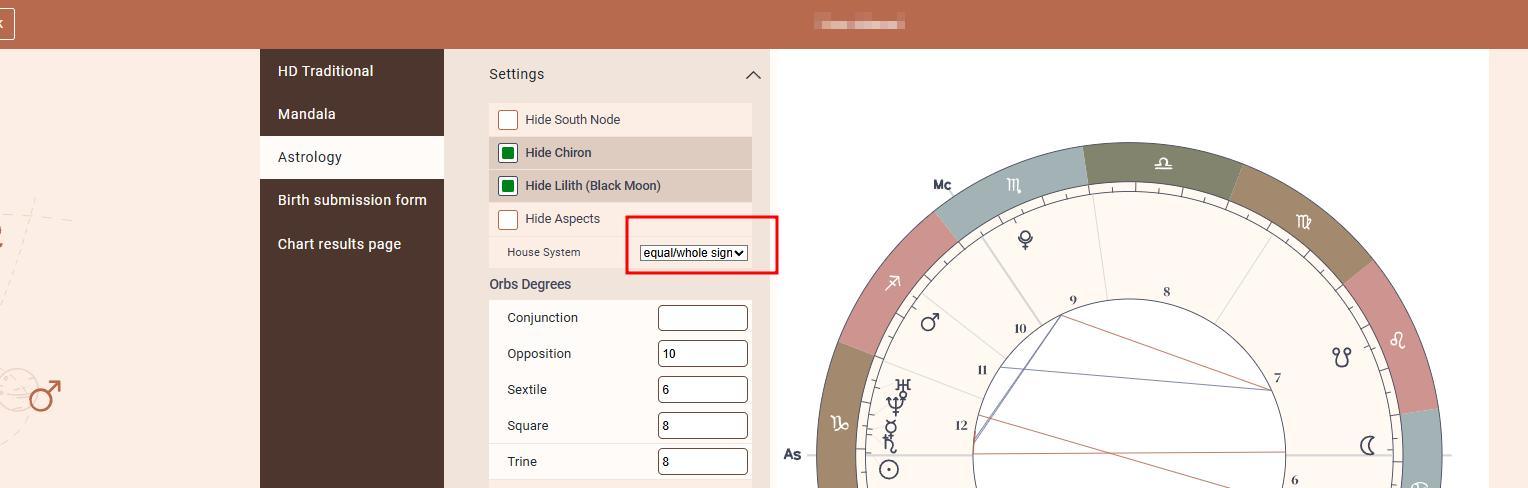
Your report settings for both PDF and audio.
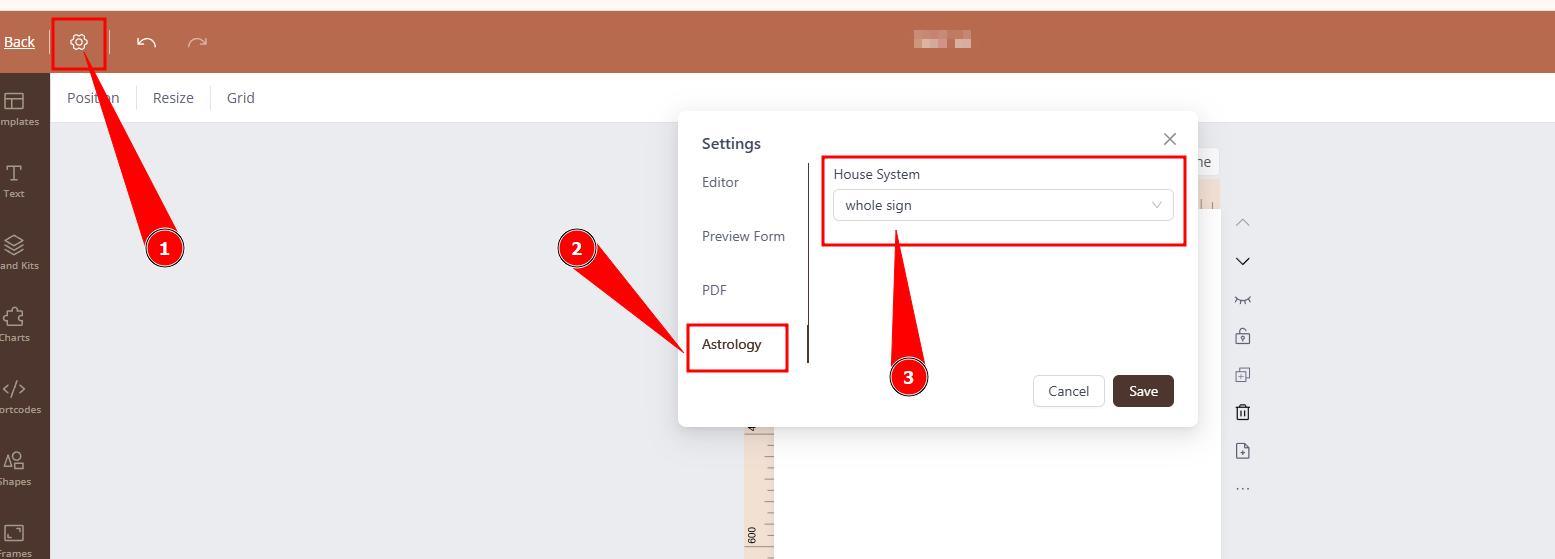
If the integration uses Whole Sign but the report uses Placidus, the output will not match the chart shown on your site, creating confusion.
Report Types
PDF reports can be created in three different formats:
Individual reports – a single chart and mixed-method (Human Design, Asrology and Frequency) content.
Relationship reports – includes Person 1, Person 2, and combined charts and visibility groups.
Cycle reports – used for returns such as solar or Chiron cycles, with visibility for person, return, and combined content.
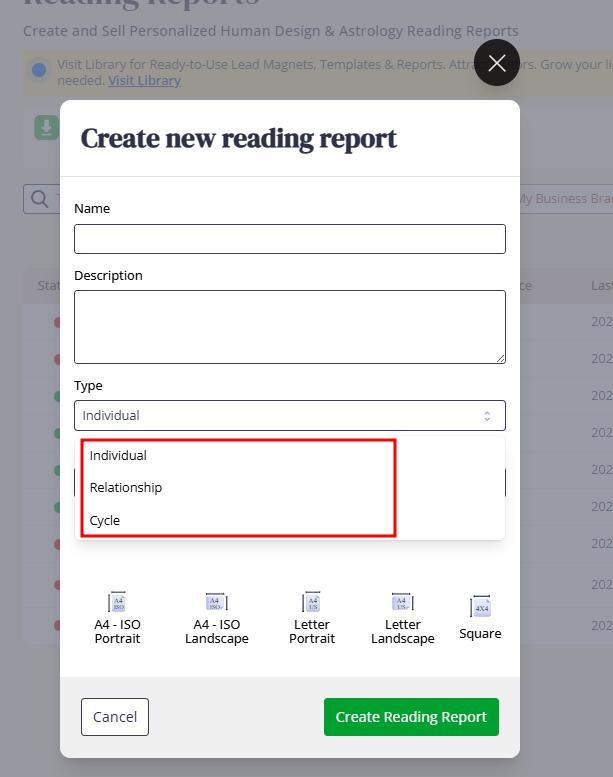
A report type must match the embed code used on your website.
If you create a relationship report, your integration must allow relationship chart submissions; otherwise the report will not appear.
Adding Content to PDF Reports
You can populate content using:
1. Static text boxes
Ideal for full reports because they allow:
Full formatting control
Clear page layout
Predictable page flow
Reliable printing results
2. Shortcodes
Dynamic text pulling definitions from the Chart Content tool.
Shortcodes work well for:
Short freebies
Lead magnets
Small introductory pages
We do not recommend shortcodes for long or detailed reports because:
Formatting is very limited.
Text cannot automatically continue onto the next page if long.
There are many variations in properties.
You cannot reliably preview all 192 incarnation cross outputs for testing.
Helpful Design Tools Inside the Editor
The report editor provides:
Guides and rulers to keep layout consistent.
Locking tools to prevent accidental movement of elements.
Page templates for quick layout building.
Dynamic charts pulled directly from your design settings.
Graphic elements including Human Design and astrology icons.
Frames for image cropping.
Bulk uploads for images.
Image size guidance:
Ideal image size: 200 to 300 KB
Avoid overusing many high-resolution full-page images
Oversized files may slow down downloads or break previews for you and your clients.
Before uploading, compress images using any standard online compression tool.
Building a Scalable, Passive-Income Report Library
There is no limit to how many reports you can create or sell.
The best performing businesses offer:
A wide selection of reports
Unique, niche related reports
Unique reports using your own content written in your tone and voice will resonate with clients the most.
Common Mistakes to Avoid
1. Mismatched astrology house systems.
The most frequent error and the most confusing for clients when astrology chart integration shows different output than reports.
2. Incorrect language assignment with shortcodes.
Shortcodes require a language set that actually contains text. If the assigned language is empty, your report will output blank sections.
3. Assuming reports go live instantly.
A report must be enabled at the chart integration or linked to the product listing (if website builder is used) in order for them to go live on sale.
4. Enabling report at the wrong embed code.
If you have multiple embed codes at Embed Chart section, please ensure that you enable reports on the embed code that is used at your website.
5. Assuming assigned different language will automatically translate ready-made reports.
Majority of the ready- made reading reports and lead magnets are built using static text and not shortcodes. Therefore if there is desire to use such report in different language, it requires manual translation page by page.
Frequently Asked Questions
Does Bodygraph.com provides complete Human Design, Astrology and Frequancy content for the reports?
No. Bodygraph is a software platform focused on providing tools and features that help automate and scale your business. While it does offer a wide selection of ready-made reading reports and lead magnets to support your start of the business, Bodygraph encourages subscribers to create their own unique reports using their own content.
Does Bodygraph.com charges the fee for the report sales?
No. Bodygraph does not charge a fee (commission) for your report sales.
Can I integrate Bodygraph.com reading reports to the external e-commerce shops (e.g. Shopify, Squarespace, WIX, etc.)?
No. Bodygraph reading reports mapping requires form submission in order to calculate and select relevant pages and/or audio tracks for the clients based on the birth details. Therefore report sales only available via chart integration. Although there are several workarounds and it is explained at this guide.
Still have questions? Is above guide outdated? Please message us on Live Chat or send an email to support@bodygraph.com.