
To delete website that is built at Bodygraph’s Website Builder, follow the steps below:
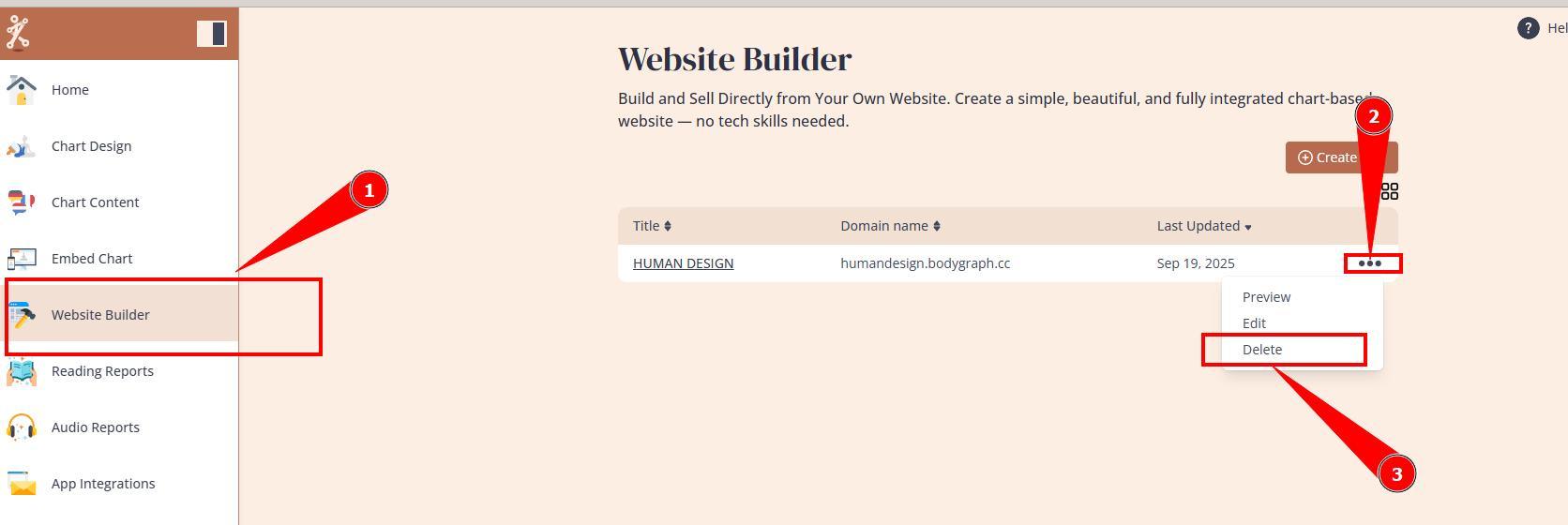
1. Navigate to Website Builder dashboard.
2. Click on 3 little dots next to Website that you wish to delete.
3. Select Delete option.
IMPORTANT: Please save, copy and download all important content from the website prior deletion as there will be no option to restore it.
Frequently asked questions:
– Can I restore deleted website?
No. Once website is deleted, there is no option to restore it.
– Shall I delete website if I want to cancel my subscription?
Yes, if you have no plans to continue using website builder in the near future. If you will not delete website prior Bodygraph subscription cancelation your website will remain active for 3 weeks and hen will be suspended.
Data on the website will remained stored for 90 days post cancelation. Data retention beyond 90 days is not guaranteed.
Related articles:
What happens to website after subscription cancelation?
Still have questions, is above guide outdated? Please message us on Live Chat or send an email to support@bodygraph.com.