
Bodygraph Reading Reports can be generated using Tropical, Sidereal, or True Sidereal calculations.
If you are creating a report for a Sidereal or True Sidereal chart, the Zodiac System selected inside the Reading Report needs to match the calculation system you are using for that customer experience.
Change the Zodiac System in a Reading Report
- Open the Reading Report you want to edit.
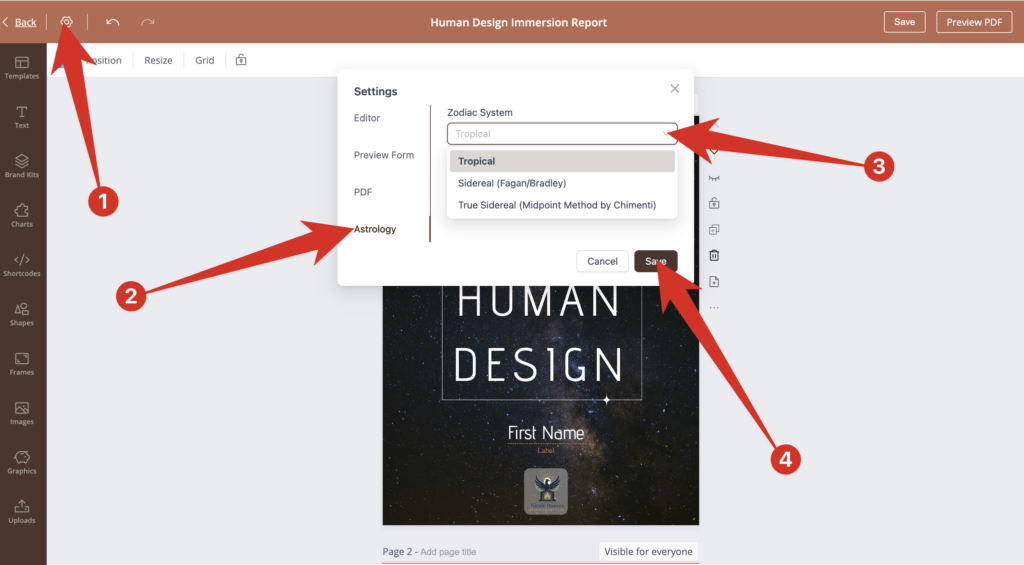
- Click the Settings icon in the upper-left corner of the Reading Report editor.
- Select Astrology from the Settings menu.
- Under Zodiac System, choose the calculation system you want to use:
- Tropical
- Sidereal (Fagan/Bradley)
- True Sidereal (Midpoint Method by Chimenti)
- Click Save.
Your Reading Report will now use the Zodiac System selected in the report settings when generating personalized report content.
Offering Both Tropical and Sidereal Reports
If you want to offer the same report in more than one Zodiac System, create a separate version of the Reading Report for each system.
For example, if you want to offer both a Tropical Human Design report and a True Sidereal Human Design report:
- Duplicate your existing Reading Report.
- Rename the duplicate so you can easily identify which version is True Sidereal.
- Open the duplicated report and change its Zodiac System to True Sidereal using the steps above.
- Save the report.
- Attach the appropriate report version to the corresponding embed code.
The Chart Design and Reading Report connected to an embed need to use the same intended Zodiac System so the chart and report are generated using the same calculation method.
Want to Learn More About the Different Systems?
For an explanation of the differences between Tropical, Sidereal, and True Sidereal Human Design, see:
Which Human Design Chart calculation Method should I use – Tropical, Sidereal, or True Sidereal?
Still have questions, is above guide outdated? Please message us on Live Chat or send an email to support@bodygraph.com.